
Product Update Category: Product
Notifications Send as Expected When Moving A Web Response to a Submission
Notifications will now send as expected when promoting a Web Response to a Submission from specific workflows.
Mass Updating Submissions Updates Status Properly
When you mass update Submissions to Client Submissions from the Submission Tab of a record, the status of all selected records will update as expected.
Distribution List Field Included on Add Submission Form
The Distribution List field is now included on the Add Submission form.
Fields Displayed Properly on Placement Change Requests
When the fields for Bonus Package and Options Package are set to display on Placements, they will also display on Placement Change Requests as expected.
New System Setting for Date Effective Field on Placement or Placement Change Request
When the new system setting suppressPlacementEffectiveDateFieldInteractions is enabled, the Date Effective field will not update to today’s date when the Pay or Bill Rate is updated on a Placement or Placement Change Request.
Changing “Mark Up %” Properly Updates Bill Rate
When you edit a Placement or Change Request, changing the Mark Up % to a new value then back to the original value will properly update the Bill Rate.
New “Open Submissions” Card Available
We’ve added a new “Open Submissions” card to the Candidate and Contact Overview Tabs! This card gives you a quick look at open Submissions associated with the record you’re viewing
Hide “View All Notes” Button
The “View All Notes” button will no longer display on the record preview for records with fewer than 10 notes.
Emailing Merge PDF Document Opens Compose Screen in Bullhorn
When you email a file created from the “Generate Merge PDF” feature, you will now be taken to the “Compose a Message” page with the .pdf file attached.
Field Interactions Available on Submission Forms
We now support Field Interactions on Client Submission forms.
Field Interactions Available for Commissions
We now support Field Interactions for internal and external commissions on the Commissions tab on Placements.
Swipe to Add Note
ZippiNote, which allows you to swipe to add a Note, is now supported for the Candidate, Contact, Job, Lead, Opportunity entities.
Deleted Submissions No Longer Display
Deleted Submissions will no longer display on the Submissions List.
Add Opportunity From Activity Tab
You can now add opportunities from the Activity tab of Company records.
Export Goals and Quotas
You can now export both Goals and Quotas with a new usertype entitlement. Please contact Bullhorn Support to have this feature enabled.
Gmail Add-On Integration Updated for Compatibility
The Gmail Add-on is now compatible with G-Suite rather than only Gmail.
Candidate Tax Info Fields Included in Edit History
Changes made to the following Candidate Tax Info fields will now be reflected in the Edit History:
- is Exempt
- Two Jobs?
- Total Dependent Claim Amount
- Other Income Amount
- Other Deductions Amount
- Federal Extra Withholding Amount
Default Break Exceptions Not Working
Break Exceptions can now only be applied to specific Brands within a region. This allows you to choose which brands use break exceptions when operating brands within the same agency and region.
OT Pay Rule Issue
Individual sites can now be excluded from overtime days using the “exclude” setting.
Duplicated UDF Records in WTE
We have fixed an issue where employee UDF records were duplicated after submitting time in Web Time Entry.
WTE Timecards Not Rounding in TMC
An issue where some web timecards were not rounding when turned on in the Time Management Console has been corrected.
KR01 Report Not Sorting Properly
The KR01 report now groups employees by ID so employees with the same name are not conflated.
Invoice Attachments Showing as “Deleted”
We have resolved an issue where invoice attachments were showing as “deleted” on timecards.
Bullhorn Time & Expense Branding
Peoplenet by Bullhorn is now Bullhorn Time & Expense. We have updated the Time Management Console with the new Bullhorn Time & Expense logo and removed some references to Peoplenet.
Bullhorn Privacy Policy
We have added a link to Bullhorn’s Privacy Policy on the Log In page.
Bullhorn Time & Expense Branding
Peoplenet by Bullhorn is now Bullhorn Time & Expense. You will see new branding on the Log In page and browser tab.
Duplicated UDF Records in WTE
We have fixed an issue where employee UDF records were duplicated after submitting time in Web Time Entry.
WTE Timecards Not Rounding in TMC
An issue where some web timecards were not rounding when turned on in the Time Management Console has been corrected.
KR01 Report Not Sorting Properly
The KR01 report now groups employees by ID so employees with the same name are not conflated.
Invoice Attachments Showing as “Deleted”
We have resolved an issue where invoice attachments were showing as “deleted” on timecards.
Bullhorn Time & Expense Branding
Peoplenet by Bullhorn is now Bullhorn Time & Expense. We have updated the Time Management Console with the new Bullhorn Time & Expense logo and removed some references to Peoplenet.
Bullhorn Privacy Policy
We have added a link to Bullhorn’s Privacy Policy on the Log In page.
Bullhorn Time & Expense Branding
Peoplenet by Bullhorn is now Bullhorn Time & Expense. You will see new branding on the Log In page and browser tab.
Add Placement Saves Date Available Accurately
When adding a Placement, the Date Available field on the Candidate record will be set correctly regardless of the user’s timezone.
Add Job Saves the Start Date Accurately
When adding a Job from the Contact preview on the Contacts list, the Start Date now saves correctly regardless of the user’s timezone.
Updated User / Department Picker for Appointments
When filtering the Planner by Department, you will now see Appointments owned by users who are both primarily and secondarily in that department.
Work History No Longer Duplicated
When parsing a resume as existing, Work History results will not be parsed in when they match the existing values.
Education History No Longer Duplicated
When parsing a resume as existing, Education History results will not be parsed in when they match the existing values.
Post-Save Page Interactions Work Correctly
Post-Save page interactions will now work correctly even if a promise call is made. The page will not reload until the promise is resolved.
New Login URL for LaborEdge
VMS Sync will now allow you to set a login URL specifically for LaborEdge VMS on the credential.
Class Field and Pay Account Name Save Successfully
In V2, values in the Pay Account Name and Class fields can now be edited or deleted successfully.
Enable AutoRun Button Works as Expected
The Enable/Disable AutoRun button in the Control Panel now functions properly and is clickable.
Redirect to Login Screen when Session Times Out
For clients on S-Release, you can now use the system setting sessionCheckInterval to check for session timeouts. If the session has timed out, the user will be taken to the login screen immediately.
ZippiNote Supported
The Mobile App now supports sliding to add a note on the Candidate, Contact, Job, Lead, and Opportunity entities.
Appointment Date Respects Local Timezone
Appointment dates now respect the local timezone on the add/edit page.
VMS Sync Admin Tools
VMS Sync released an Admin Tools portal that:
- Improves the user experience
- Streamlines VMS automation process management
- Increases website security
Admin Tools replaces the VMS Sync Dashboard on January 10, 2020.
Admin Tools Features
- Improved User Experience
- Streamlined Processes: The VMS Sync Admin dashboard offers real-time position monitoring with self-service troubleshooting capabilities, including the ability to view:
- Positions data and positions reports
- Information about the position or requisition as VMS Sync processed it
- The timing of the position processing
- Edit log visibility, including Admin Tool change tracking
- Error details (in case of failure)
Manual Time Entry Error
We have resolved an issue where administrators would receive an error when manually adding in and out times for employees with non-worked adjustment codes in the TMC.
Error Using Print for Fax Approval
An issue where printing a timecard to be faxed for approval was not working properly has been corrected.
Adding Tax Lines to Tax Profiles
Tax Lines can now be added to Tax Profiles as expected.
Load Hours Import Profiles Successfully
Hours Import Profiles will now load as expected.
Completing Tasks from the Overview Tab
Tasks can now be completed from the Overview tab on Tasks.
Completing a Task for Users in the Same Department
Users entitled to complete Tasks owned by other users in their own department can now do so.
Notifying Internal Users About Submissions
When adding a Submission and notifying a Distribution List, you will now see a message that contains the number of internal users that will be notified. The message will also let you know if the Distribution List contains no internal users, in which case, no one will be notified.
Custom Tabs on Lead Records
Custom Tabs are now supported on Lead records.
Custom Tabs on Lead Records
Custom Tabs are now supported on Lead records.
Save Date and Time Correctly When Copying Records
Date Fields such as ‘Start Date’ and ‘Scheduled End’ on a Placement will no longer display as Date/Time when viewed on the Submission tab unless configured to do so.
Preview Files When Creating a Client Submission
When creating a Client Submission, you can now preview the file(s) you are about to send.
Respect Local Time Zones on Add and Edit Appointment Screens
Appointment dates will now respect your local time zone on the add and edit screens.
Display Dates in User Activity Report Accurately
The User Activity Report will now show activity dates accurately regardless of your time zone.
Departments in the Notes Activity Report
The Notes Activity Report will now respect department criteria and user permissions for department-level data viewing.
List and View Layout Support for New Candidate Tax Info Fields
The following six fields can now be searched and sorted via list views and can be configured using View Layout:
- Two Jobs?
- Total Dependent Claim Amount
- Other Income Amount
- Other Deductions Amount
- Federal Extra Withholding Amount (for each pay period)
- Is Exempt?
Advanced Note Searching Support on Contact and Lead Lists
Advanced Note Searching is now supported on the Contact and Lead lists. Advanced Note Searching makes searching notes via list views easier by pulling all note-related search fields into their own area on your search box.
Department Counts on Dashboard Cards
Filtering dashboard cards by Department will no longer include records owned by disabled user accounts.
Canvas Support for New Candidate Tax Info Fields
Bullhorn Canvas can now report against the following six Candidate Tax Info fields:
- Two Jobs?
- Total Dependent Claim Amount
- Other Income Amount
- Other Deductions Amount
- Federal Extra Withholding Amount (for each pay period)
- Is Exempt?
Pay & Bill Menu Folder
Billable Charges, Invoices, and Payable Charges will now be grouped in a Pay & Bill folder on the menu.
Email PDF Action
You are now able to email the Invoice PDF through an action on the Invoice Statement screen. This was previously only possible as part of the Invoice Finalize process.
Freeze Filters When Scrolling
The filters across the top of the Receivables List will now remain in place when scrolling down the list.
Success Messages
Success messages will now display as green pop-ups so that workflow icons are no longer blocked by a banner.
ATS Refresh Notification
The ATS Refresh notification will now display as a green pop-up so that workflow icons are no longer blocked by a banner.
Render Apostrophes in Standard Reports
Apostrophes (‘) will now display correctly in Bullhorn’s Standard Reports.
Job Tracks
Job Tracks are now supported in the Bullhorn Mobile App.
Microsoft Azure SSO Certificate Refresh
Bullhorn will now handle Azure SSO certificates automatically and will renew and refresh them so that they do not expire.
New Fields on Candidate Tax Info Tab
Six new fields have been added to the Candidate Tax Info tab to adhere to 2020 W4 forms:
- Two Jobs?
- Total Dependent Claim Amount
- Other Income Amount
- Other Deductions Amount
- Federal Extra Withholding Amount (for each pay period)
- Is Exempt?
Rebrand to Bullhorn Chrome Extension
The Bullhorn Accelerator has been rebranded to ‘Bullhorn Chrome Extension’.
Mass Update Invoices to ‘Finalized’
You are now able to update the status of ‘Ready’ Invoices to ‘Finalized’ from an action on the Invoice List.
Mass Update Invoice Statement Date
You are now able to update the Invoice Statement Date for up to 500 records at once from an action on the Invoice List.
Sign-On Notification Should Not Block Workflow
The sign-on notification has been made smaller to prevent it from blocking BBO / Onboarding tabs.
Employee ‘New Document Added’ Notification
The ‘New Document Added’ notification an employee receives upon logging in will now be translated correctly for non-English employees.
View Invoices on Client Corporation Records
You can now view invoices on Client Corporation records.
View Payable Charges on Placement Records
You can now view Payable Charges on Placement records.
View Payable Charges on Candidate Records
You can now view Payable Charges on Candidate records.
View Billable Charges on Placement Records
You can now view Billable Charges on Placement records.
Marking a Single Billable Charge as “Ready to Bill”
Pay & Bill users with the necessary user entitlements can now mark a Billable Charge as “Ready to Bill” which makes the transactions eligible for invoicing. Note that only Billable Charges in “Needs Review” or “Not Ready to Bill” are eligible.
Selecting Multiple PTO Types
Selecting multiple PTO types from a Candidate record will now save the selected options as expected.
Editing Permanent Placements
You can now edit Permanent Placements as expected if Expenses are enabled.
Changes to Time Step Increments
Changes made to time step increments will now save as expected.
Numbered Attachment Icon on Document List
The Document list will now display a numbered attachment icon to show how many attachments are on a document.
Columns on the Placement and Employee Lists
All columns on the Placement and Employee lists now allow multiple values to be selected.
Scan and Upload
E-Verify has a new status of “Scan and Upload”, which requires users to upload photo documentation to support a case. 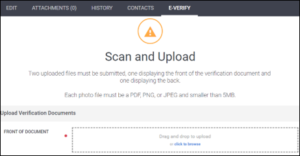
Case Statuses
E-Verify has updated the list of case statuses:
| Version 29 Value | Version 30 Value |
| N/A | Draft (new value) |
| N/A | Scan and Upload (new value) |
| Sent | I9 Sent |
| In Progress | I9 In Progress |
| Submitted | I9 Submitted |
| Unconfirmed Data | Review and Update Data |
| Photo Match | Photo Matching Required |
| Pending Referral | Tentative Non-Confirmation |
| Referred | Pending E-Verify Action |
| Queued | Pending E-Verify Action |
| Employment Authorized | Authorized |
| Close Case and Resubmit | Resubmit Case |
| No Action FNC | Final Non-Confirmation |
Authorized Representatives Submitting Cases
Authorized Representatives submitting an E-Verify case must now enter the following information upon each case creation per E-Verify’s requirements for version 30:
- Name
- Email Address
Phone Number (with optional extension)
Administrators Submitting Cases
Administrators submitting an E-Verify case must now verify and/or enter the following information upon each case creation per E-Verify’s requirements for version 30:
- Name
- Email Address
- Phone Number (with optional extension)
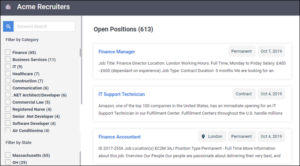
Version 3.0 of the Open Source Career Portal
Our Open Source Career Portal (OSCP) is getting updated! On 30 October 2019, we are releasing two new versions of the OSCP: the standard OSCP and the OSCP with Advanced Hosting. Both versions will contain additional features:
- Standard OSCP
- New look and feel
- Ability to add Google Analytics to track Job views and applications
- Ability to easily display additional Job fields from Bullhorn
- OSCP with Advanced Hosting – This version must be hosted to take advantage of server-side rendering using Node.js scripts. This will require knowledge of server administration and we recommend the use of a web developer.This version will allow you to take advantage of the following new features:
-
- Everything included in the standard OSCP
- The ability for a web developer to configure Google Jobs support
- The ability for a web developer to export an XML feed of the OSCP
- Rich social sharing: Job titles, links, and thumbnails will all be included when sharing Jobs to social media.
Version 3.0 will be released on our Github page on 30 October 2019.
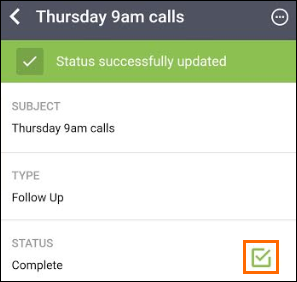
Add and Edit Tasks
The ability to add and edit Tasks is now available in the latest version of the Bullhorn Mobile App. Additionally, you can now complete a Task by tapping the checkmark on the Task.
Employment Type Field Uses Display Values
The Employment Type field will now show Display Values when adding a Job if the field is configured to use them in Field Maps.
Duplicate Checker Respects User Entitlements
The duplicate checker will now work correctly for users that have department-based “view” entitlements.
Launch 3rd Party Email Client When Emailing from a Placement
Selecting “Email Contacts” or “Email Candidates” from a Placement record will now open your 3rd party email client as expected if your Outbound Email Configuration user setting is set to “Yes”.
Opening the Placement List from the Starts & Ends Dashboard Card
Clicking “View All” from the Starts & Ends dashboard card will now open the Placement List with the expected results if the card is filtered by department.
Respect Time Zone When Sending Appointments
Appointments sent from Bullhorn will now default to your local time zone instead of Coordinated Universal Time.
Opening Lists from Dashboard Cards
Opening a list view from a dashboard card will now work as expected if the card’s filter contains an ampersand (&).